

In the example below, I display the original photo, after the iPhone “clean-up,” and one where I removed distractions using Lightroom. The results suggest that there was a minimal number of people there enjoying this historical landmark. Clean Up is only available in the iPhone 15 Pro & Max and all iPhone 16's with IOS 18.1 or higher.
This photography editing tool, along with the other cool features of the iPhone Camera, is discussed in detail at my iPhone Photography Class. Next class is scheduled to begin on Wednesday, July 23, at 6:30 pm (three sessions). An Adobe Lightroom class, for more advanced photo editing, starts on August 5th.
0 Comments
A Journey of Simplified Photography Our photographs tell a story, whether in our backyard or some faraway location. On a recent trip to Venice and other countries along the Adriatic, I made the difficult decision to leave my expensive mirrorless camera at home for this vacation, instead using only my iPhone 16 Pro. This decision, based on the photographic capabilities of the iPhone 16 Pro and convenience, turned out to be the right one for this trip. I wanted to prove that you can tell my story of this trip well with a mobile phone. The Decision to Simplify: The thought of carrying my mirrorless camera, lenses, and accessories felt overwhelming. I sought spontaneity and a sense of lightness. The iPhone 16 Pro, with its advanced camera capabilities and compact size, was a natural choice for Venice’s historic architecture, landscapes, and the region's cultural richness. This decision may be different on future trips, such as a planned visit to the Galapagos Islands and Machu Picchu. However, for this journey, the iPhone made sense. Besides, I teach iPhone Photography, so taking only the iPhone with me would tell a compelling story. Taking Advantage of Technology: What set the iPhone 16 Pro apart was not just its ease of use, but the sheer technological power packed into its design. Here are some standout features that helped make the iPhone ideal for this trip:
Example the "Clean Up" function Mindfulness: I teach Mindfulness in Photography, which is a discipline to “take fewer yet better photos”. Initially, I failed, as there were so many photo opportunities in Venice. It took a few days to find my mindfulness rhythm. Yet, having only the iPhone gave me more freedom and allowed me to “see and experience” Venice and the other countries on this trip. Another way to think of Mindfulness is enjoy where you are, be in the moment, with photography being a second consideration. Challenges: The iPhone 16 Pro offers fine photography; however, mirrorless Cameras, like my Nikon Zf, are better for some subjects. Certainly, some scenes made me wish I had my Nikon, but overall, I was pleased with the decision to leave this camera behind. However, I found the iPhone screen challenging in bright sunlight. At times, I found the camera accidentally in video or other modes, or different settings. In a few cases, I missed the shot or clicked the shutter and hoped I would get the picture. In future releases, I understand the camera mode will be a menu choice, which will be helpful. Even with extended battery performance, long days of shooting and navigation drained power quickly. I carried a portable battery charger and a camera grip that had a built-in charger (see Recommended Accessories). Recommended Accessories: For this trip, I decided to purchase a phone grip and found one that had a battery charger built in. The grip had a Bluetooth shutter release. The battery charger was nice to have, but the Bluetooth connection was inconsistent. If it didn’t have Bluetooth issues, I would recommend this product. Secondly, I was interested in a wide-angle lens, but I returned this item before traveling. The iPhone lens is sufficient, and the lens accessory was cumbersome. Returning the lens was a good decision. The third accessory was a portable battery charger. This was unlike the Grip, and some could connect to multiple cell-phones for cafe recharging. The last accessory was inspired by nightmares I had, in which I dropped my phone into one of Venice’s canals, ultimately ruining my photography venture. A simple ring placed between the phone and case, with a lanyard that I can place on my wrist, solved this fear. A New Way to See the World: Using the iPhone 16 Pro exclusively for photography wasn’t just a practical choice; it was a philosophical shift. It reminded me that photography isn’t about equipment, it’s about the stories we seek to tell. The device’s portability, versatility, and power encouraged me to spend more time “seeing”, being mindful, and enjoying my travels. Conclusion:
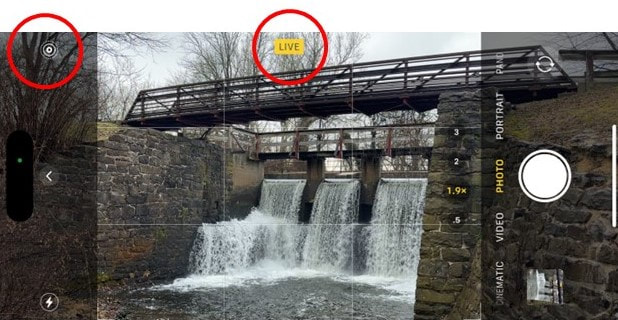
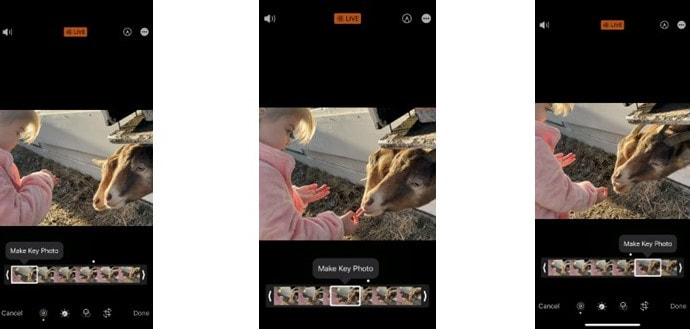
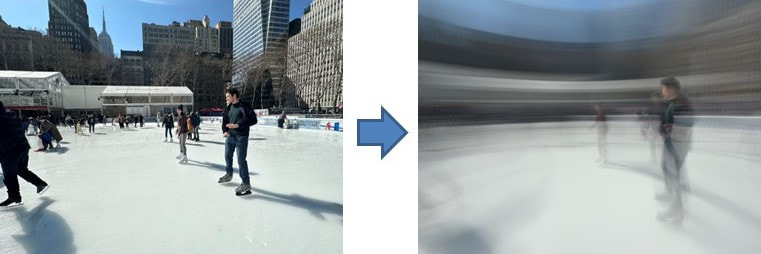
By the end of my European adventure, I felt liberated from the weight of my mirrorless camera and equally empowered by the capabilities of the iPhone 16 Pro. It proved itself to be more than just a substitute—it became an artistic companion, a tool that adapted to my vision and brought my experiences vividly to life. Would I leave my mirrorless camera behind again? Maybe. There are places I would bring my Nikon, such as the previously mentioned Galapagos Islands. However, the iPhone 16 Pro has redefined the boundaries of mobile photography and reshaped the way I travel and tell my story. For anyone considering simplifying their photography gear, I wholeheartedly recommend trusting the smartphone; the results may surprise you in ways you never imagined. PS: Please purchase/upgrade to the Pro or Max version of the iPhone 16. This version has all the features you want for your travel and creative photography. The iPhone 13/14 introduces an enhanced macro photography function that allows users to capture stunning close-up shots of small subjects with incredible detail and clarity. Leveraging advanced camera technology, the macro mode on the iPhone 13/14 camera enables users to explore the miniature world around them and capture intricate details that may not be visible to the naked eye. Dedicated Macro Lens: The iPhone incorporates a specialized macro lens designed specifically for close-up photography. This lens enables users to focus on subjects at an extremely close distance, typically ranging from a few millimeters to a few centimeters away. The dedicated lens ensures optimal clarity and sharpness in macro shots. Autofocus and Focus Stacking: The macro mode on the iPhone camera includes advanced autofocus capabilities to ensure that the subject is sharply focused. With the help of focus stacking technology, the camera captures multiple images at different focus distances and combines them to create a final image with a wider depth of field. This technique ensures that a greater portion of the subject remains in focus, even with the shallow depth of field typically associated with macro photography. Improved Image Processing: The iPhone leverages its powerful image processing capabilities to enhance the quality of macro shots. The camera's computational photography algorithms work in tandem with the dedicated macro lens to optimize sharpness, color accuracy, and dynamic range. This results in vibrant and detailed macro images with accurate colors and minimal noise. Macro Lighting: Adequate lighting is crucial for macro photography. The iPhone camera incorporates enhanced macro lighting features to ensure well-lit and evenly illuminated macro shots. The camera may utilize the device's built-in flash or adapt to ambient lighting conditions, intelligently adjusting exposure and white balance to provide optimal lighting for close-up subjects. Macro Photography Tips: To maximize the potential of the macro photography function on the iPhone, consider the following tips: a. Stability: Due to the close-proximity to the subject, even the slightest movements can result in blurriness. It's advisable to use a tripod or stabilize your iPhone when capturing macro shots. b. Composition: Pay attention to the composition of your macro shots. Explore different angles, perspectives, and framing options to highlight the unique details and textures of your subject. By the way, this is one of the principals of mindful photography. c. Lighting Control: Experiment with lighting conditions to create different moods and effects in your macro images. Consider using natural light, diffusers, or additional lighting sources to achieve desired results. d. Manual Adjustments: The iPhone may provide manual controls or settings for macro photography. Explore these options to fine-tune exposure, focus, and other parameters for optimal results. In summary, the macro photography function on the iPhone empowers users to capture incredible close-up shots with exceptional detail and clarity. With a dedicated macro lens, advanced autofocus, image processing capabilities, and optimized lighting, the iPhone enables users to explore and document the fascinating world of tiny subjects with ease and creativity. PS: In full disclosure, much of this article was written by ChatGPT. I am undecided whether this is a good thing or not. Apple iPhones have long since provided the capability to begin taking photos, when the camera app is on, even before you depress the shutter button. When this feature first appeared, with the iPhone 6, I could not see the value of this creepy feature. However, with new functions added to Live, I realize this is a powerful and useful feature. When "Live" is on (as in the photo above), the feature retains 1.5 seconds of pictures (or about 6 individual photos) before and after the shutter is depressed. When you view a Live photo, it displays like a mini-movie. OK, so how can you use Live to enhance your pictures? First, have you ever taken a group photo, and invariably someone's eyes are closed? With Live on, you actually can choose among the six photos where one will (most likely) have a good photo with everyone's eyes open. This selection is made in the editor. Look for the small bullseye at the bottom of the editor (see photo below). Another advantage to Live can be seen above, where my granddaughter was feeding a goat. Capturig the right moment is easy with Live. For me, the real power is the ability to create a "long exposure", where the iPhone combines all six images to create one dramatic photo. The photo (above) on the left shows the water in stop motion, yet when you selected Long Exposure, you get the picture on the right, with the water flowing. The photo on the right would require a tripod and shutter release with a traditional camera, yet this was achieved with the iPhone hand-held! You can achieve many other creative photos, such as this skater at Bryant Park.

We cover the Live feature including other options in our two-day iPhone Creative Photography classes. Visit our photography class schedule for upcoming iphone classes. Use promo code News05 for a discount, where applicable. |
Categories
All
|


